
Why Maxxit shows stale or unavailable usage
Maxxit needs a valid reading from your official coding assistant. Refreshing the app rereads local records; it cannot create a new provider reading or confirm that an expired allowance has renewed. Start with the connection status and the observation time.
Read the status before reconnecting
| What you see | What it means | Next step |
|---|---|---|
| Not connected | Local collection is disabled for that assistant. | Open Connections and select Connect local usage. |
| Waiting | The connection has no usable observation yet. | Use the official CLI and wait for its next usage update. |
| Stale, with a percentage marked last read | The observation is at least two hours old. Its percentage is historical. | Produce a fresh CLI response. Check the Observed time afterward. |
| Unavailable | A required value is missing, the source marks the window unavailable, or its reset deadline has passed. | Wait for a new reported window. Do not assume zero usage or a full refill. |
Zero percent remaining is a valid reported value. Missing data is different. A connected assistant can still have an unavailable window when its CLI does not supply the required fields.
A reproducible display example
Maxxit's isolated display tests use a synthetic window with 7% used and a future reset. At 119 minutes old, it shows 93% left. At 120 minutes, it shows Stale and 93% last read. Removing the percentage or passing the reset deadline makes it Unavailable. These are fixture results, not a measured provider allowance.
Get a fresh reading in this order
- Finish Maxxit's browser account approval if the app asks you to sign in. Your Maxxit account and your coding assistant's account are separate.
- Open Connections. Confirm that local usage is connected for the assistant you use.
- Open the official Codex CLI or Claude Code CLI. Confirm its own sign-in and use it for a normal task you intended to run.
- Return to Maxxit and select Refresh usage, or let background collection run. Check whether Observed advances and the window becomes available.
Codex readings come from local session records under CODEX_HOME/sessions or ~/.codex/sessions. A different CLI installation, source location or recent provider account can explain a mismatch. Check the source you actually used before changing a connection. Local token history is partial activity and does not establish remaining subscription capacity.
For the full setup, read the installation and usage guide. For provider sign-in and connection steps, use the Codex setup instructions or Claude Code setup instructions. Maxxit does not need provider passwords or tokens pasted into the app.
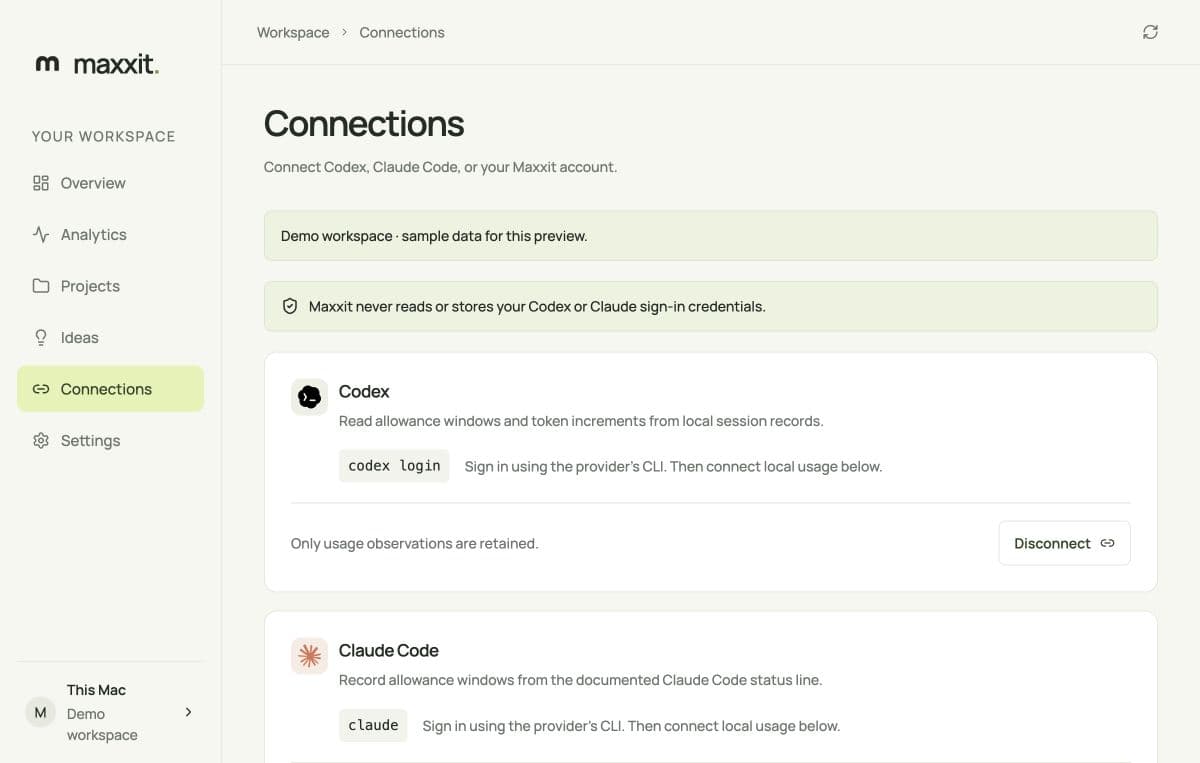
Check Claude Code's status line
Maxxit reads Claude's documented five-hour and seven-day allowance fields through the status-line bridge you review in Connections. Claude Code can omit either window. Its documentation says rate-limit fields appear after the first API response and depend on the account or gateway. Maxxit's bridge reads the five-hour and seven-day fields; it does not turn a gateway spending limit into subscription allowance.
A status line can rerun without a new provider response. Maxxit keeps the original observation timestamp when the captured allowance fields are identical. Repeated polling therefore does not make an old reading fresh. Claude's status-line field reference describes field availability, and the released bridge shows what Maxxit retains.
If you changed Claude settings or moved the app after connecting, review the status-line configuration. Disconnect restores the previous command only when safe. If Maxxit reports a restoration conflict, inspect the previous and current commands before editing. Do not overwrite a newer custom status line or delete its backup to clear the message.
After sleep or a reset, check time and source
The age of the observation continues to grow while the Mac sleeps. On wake, a reread can still show the old percentage. After a reset deadline passes, Maxxit shows Awaiting next observation until the source reports a new window. A countdown reaching zero does not confirm a refill.
Check that macOS has the correct date and time, then use the assistant and refresh. Provider format changes can also leave a window unknown. Update through Maxxit's normal signed updater and follow the official CLI's update instructions if a version is outdated. Preserve records while investigating.
A previously verified Maxxit account can use local features offline for seven days. An account-approval or offline-access error is separate from missing provider allowance. Reconnect to the Maxxit service when requested; reinstalling the app is not a substitute for account approval.
Report a reproducible problem safely
If a fresh official CLI response still leaves the window unavailable, record your Maxxit version, macOS version, CLI version, provider name, status label, and a short sequence of steps. Include whether the observation time advanced. Say whether the problem started after an app or CLI update, account change, sleep, or a status-line edit.
Use Maxxit's public issue tracker for a sanitized reproduction, or contact contact@maxxit.app. Remove account labels, prompts, project paths, credentials and raw session files. Read the privacy policy before sharing diagnostics. Keep Gatekeeper enabled and retain existing Keychain items.
Scope and sources
This guide checks Maxxit v0.1.17's released source and isolated freshness fixtures. It does not claim that every provider account exposes allowance, or that a live Claude connection was tested for this article. Provider formats and field availability can change.